Thursday, 1 August 2013

Clarion IP Driver and MS SQL Server


.
Clarion IP Driver and MS SQL Server


Normally when you create a Clarion programme that accesses  an SQL Server you would define the details of the connection string in the owner field of the dictionary properties for the table.  This can be hard coded or a variable.

One of the issues that’s been a problem with the Clarion IP Driver/ Server has been the inability to change the sql connection string at runtime.

By exhaustively checking various options I have found a solution that appears to work and allows the programmer to change the SQL Connection string at runtime.

Tip - Don’t define the variable as part of the dictionary’s global variables.
In my example I’m using a variable called servervariable (this is defined in the data dll global as a string)
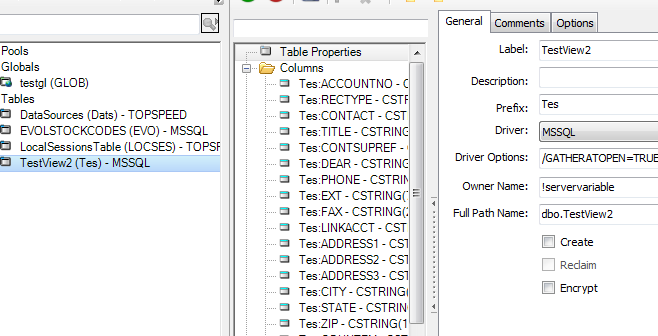
IP Driver Variables
To change variables on the Clarion IP Server you will need to define the variables (global) in your IP Data DLL. In addition you will need to allow them to be accessed/changed by the IP Client Application (to do this you will need to use the extended features of the IP Driver)

You will need five variables in all (of course you can use names that are meaningful to you)

ServerVariable String - use this as the owner attribute for the sql table/s
DBServer - String/Cstring - the details/name of the SQL Server
DBDataBase - String/Cstring - the name of the SQL Database
DBUsername - String/Cstring - the user name to be used to connect - in my case I created a separate user clarionipserver in the SQL Server for the Clarion IP Server to use for connection
DBPassword - String/Cstring - the password used to access the SQL Server
* Optional - you’ll need a variable for the DBport if you’re not using the default SQL TCP/IP port of 1433

IP Data DLL
In the IP Data DLL after creating the variables, using the IPDRV Extended options make the variables available for the IP Client Application

IP Data DLL - Embed Point for concatenating the variables and assigning to the ServerVariable
Global Embeds > Program Setup > after Extended Options Init
Pass the values to the ServerVariable here.
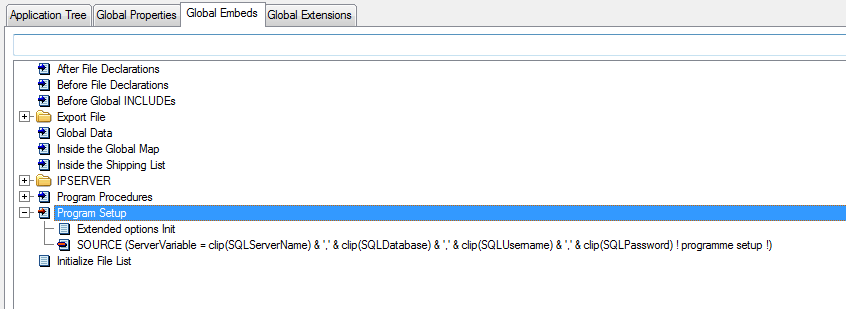

That’s all that’s required for the Data DLL, next the IP client will need some settings defined.

IP Client Application
In the IP client application you’ll need to check that the IP Data DLL variables are available. This is available as a global extension - IP Client - IPDRV Extended  


Assigning the variables
There are many ways you can store and retrieve the data to assign to the variables;
INI File, Local Data File, TPS File on the IP Server and many other options.

In my testing I decided to use an IP Driver enabled TPS file to store the details for the SQL Server. TIP - makes sure you open and retrieve the data from this file and set the variables on the IP Server prior to opening the SQL Table

Setting the Variables on the IP Server from the Client
To set the variables you can choose to use the IP template extension “set remote” Clarion IP Driver and MS SQL Server
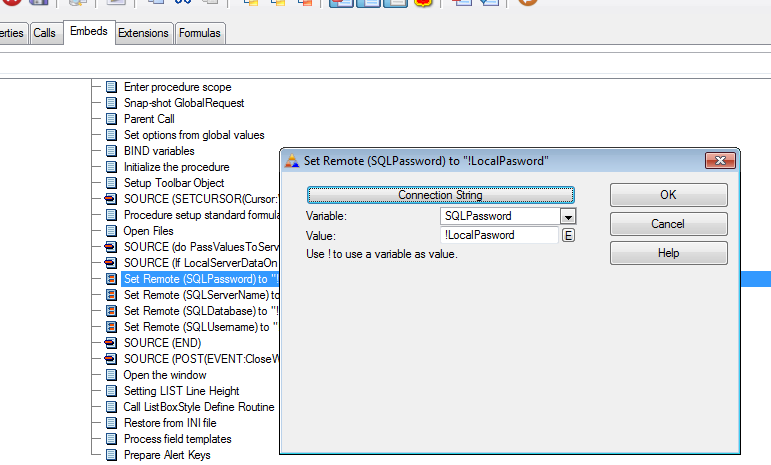
In the example I call the Data settings table to retrieve the variable data after the open files embed in the Main procedure. (I’m not opening the SQL Table until I select a browse containing the data).


Things to know
Trying to set the ServerVariable on the IP Client doesn’t work. The IP Server appears to treat the comma separated values of an SQL connection string as different parameters and only takes the first value (the SQL Server Name)

Make sure that the SQL Server security settings allow the SQL user you’ve defined for the IP Server are valid and have the correct access attributes

Changing SQL Servers and  SQL Databases has been tested and works.

Why Use SQL and IP Driver?
There have been a number of discussions around this. We have a number of IP Driver apps that sit well in the small business/commercial space. In this instance a client needed to have client details imported in real time from their MS SQL based CRM.


Friday, 26 July 2013

Winning combination

Winning combination


Brother MFC-J6910DW and HL-2250DN
I recently purchased a Brother MFC-J6910. An excellent multi function centre that allows for scanning of up to A3 size paper. You are able to set up a number of scan locations if you're scanning to PDF (or images) or you can use it as a pseudo-photocopier (I'd argue more useful in most small office situations). The ADF (sheet feeder) will accommodate up to 35 sheets of paper.

The J6910 has two trays so you are able to load A3 and A4 paper.


MFC-J6910
  • Brilliant
  • Wired - Network
  • Wireless Network
  • USB
  • Fax
  • A4
  • A3
  • Colour
  • Duplex (double sided printing)
All in all a fantastic, reliable, easy to use (and set up) MFC. If you get stuck - excellent support from Brother's help line.

Brother MFC-J6910DW and HL-2250DN

Bought and installed a Brother HL-2250DN today. Why? Because most of our volume printing is monochrome. Fast (26ppm) and another reliable "little" Brother. 

It's very easy to install. It took me longer to find the scissors to open the carton than it it did to set it up. The printer comes with the usual Brother installer CD - just follow the prompts and away you go.

  • Brilliant
  • Wired - Network
  • USB
  • A4
  • Duplex (double sided printing)
The Combination

I've got the best of both worlds. A4/A3 Colour and higher speed monochrome laser. All for under AUD$600. (Look around plenty of suppliers) and networked.

Wish-list
Next item on my wish-list - The Brother HL-S7000 100 ppm monochrome. Why? I've seen it in action and it's a ball-tearer!

Tips
D = Duplex , W = Wireless , N = Network, PPM = Pages Per Minute
Always use good quality paper for the best results

Using Ubuntu?
The Über Geeks at Brother have done it again. Visit this page for a very quick and simple method for installing your Brother printer in Linux.


Saturday, 18 May 2013

Brother TD-4100N

I've written about the Brother TD-4000 in the past. It's a great printer and it does a sterling job as both a receipt and label printer.

Brother also offer a network version of the same printer, the TD-4100N.

From our beta testing with our etouchOS Retail Point of Sale, we've discovered that both printers just keep on. In a network environment where you want to share printers, I'd strongly recommend spending that bit extra and go with the network printer. In fact, I'd suggest that where possible, always chose the network option over the standard printer irrespective as to whether it's a receipt/label printer or just for printing documents. The same approach applies to Multi-Function Centres as well, make it easy to print from PCs, laptops and phones.

Why? 

Because it's easier when you have different devices with different operating systems wanting to print to the same device. Use a printer designed to be networked.

Just sayin'.

Brother have a comprehensive range of printers from entry level to 100 pages per minute - check them out here :- www.brother.com.au


Friday, 7 December 2012

The Brother that just keeps on going

Had an interesting conversation with a good JobCardTs client, Arno from Anderwald Automotive the other day.

We got around to talking about printers. I know, not the normal conversation you'd have, but still Arno knows that I'm a Brother "fan boy" and was telling me about how he saw the light and became a Brother brother.

 Arno had a number of printers (brand name will remain anonymous to protect the guilty), over a 12 month period. Every printer failed when a new ink cartridge was loaded! Let me just re-iterate. Every printer failed when a new ink cartridge was loaded!

Now to be fair, the workshop does get dusty and greasy from time to time. Arno probably thinks it's worse than it really is, I think it seems fairly clean for a large workspace.

Arno has three Brother printers! Yes, you heard right. Three. Two in the workshop (not in an office in the workshop!) and one at home.

He was telling me that a mate of his told him to get a Brother after the third previous printer failed. He was sceptical, the Brother cost a bit more, but he was told he wouldn't regret it.

And he hasn't.

In the workshop.

Two printers.

Been there for over two years.

Still working perfectly, every time!


Thursday, 22 November 2012

It's been a while.. etouchOS Retail update

Well here we are, late November 2012 and we're still testing the etouchOS Retail point of sale.

With help from the fellows at Il Toro and Subito the product is becoming much more stable and very user friendly.

Needless to say the Brother TD4000 printers haven't missed a beat. In fact, Jim at Il Toro has also been using the printer to produce his food labels for the prepared meals he creates.

Hard? Not at all, Jim removed the receipt paper and loaded his label roll and then created his labels in Brother's P-Touch software, and hey presto! Done.

A really simple process that gives Jim the productivity tools he needs. No need to have several printers dedicated to one function. Oh, he does have the fantastic Brother A3 printer for printing his menus. A huge saving, no traipsing off to the local printer, just do it yourself. A4 or A3, in colour. His choice.

Anyway, enough of the Brother cheer squad here.

Why is etouchOS Retail taking so long?

When we began, we were a bit naïve, well certainly I was, I'm sure my son realised that it was going to take more than I did to create a comprehensive Point of Sale solution.

The feedback I've been getting from Jim and Damian (Subito) is making the product more robust and better featured. Damian and Sam (his brother) had a two week period where they were unable to use a POS.

Their existing subscription with their previous supplier had expired and I still had a bit to do to get the network version of etouchOS Retail working. Damian tells me that they went back to the old manual paper dockets for that fortnight. Doesn't want to do it again!

I feel that I can quote Damian when he says that, "etouch Retail is the best POS he's ever used". So as the developer I feel that I'm heading in the right direction.

So, here's an offer, if you need POS (or want to update to the latest and greatest!), purchase a Brother TD4000 (or TD4100N) and we'll let you have the beta version of etouch Retail - and only bill you once it goes gold! You can purchase these printers through us or talk to your IT support to source them..

New features soon... street address lookup (Australia Only at this stage)..

Productivity
Anyone who knows me knows that I bang on about productivity all of the time. Even if you don't have a need for POS, checkout the Brother offers.  Do it smarter not harder!


Friday, 12 October 2012

etouchOS Retail Network Version

Well testing of etouchOS Retail Point of Sale is going well.

Our friends in Adelaide at Il Toro and at Subito have been putting the software through its paces. We're updating every couple of days now as we fix bugs and add in new features. There's still a fair bit to do, but the list is getting shorter.

Tomorrow (Saturday 13th Oct) we're going to install the beta network version at Subito, so fingers crossed! So far internal testing shows that the performance once loaded is very good.

We imported all of Subito's clients the other day from their old system using CSV (Microsoft Excel) format structure. In addition this next release incorporates the ability to set-up special offers and combo deals.

The one thing we haven't had to worry about is the Brother TD4000 printers. Ask any programmer what concerns them the most with business applications, and I'll bet that the majority will say "printing".

Our colleagues at Brother have lent us a Brother TD4100N for testing, it's the network version of the TD4000 and it's been a really good unit, no matter what errors have come from my keyboard, it's still churning away!

If you take advantage of our Brother special offer before the gold release of etouchOS Retail, we won't bill you until 3 months after the gold release for your etouchOS licence/s. (of course you will need to purchase the qualifying printers).

Drop us a line if you want to take up the special offer and you're feeling adventurous.  We'll let you install the beta version of the software and participate in the joy (and pain) of creating a great product. (on the understanding that you know that the software is still in development and the software is designed for Australia).

Anyway, enough about the printers, I don't have to worry about them, although I still have a bit to do to provide the etouchOS link to Brother's P-Touch software for the label printing.

Thankfully Jim (Il Toro), Sam and Damian (Subito) have been run off their feet (my waist can attest to their excellent culinary skills) and haven't been in my ear about labelling yet.

If you're in Adelaide, look them up, home cooked food like mama used to make!


For the Geek within;

Our internal testing has shown that the network version performs as well as the single user version after the initial load. The approach I've taken is to cache everything in memory and only write new and changed records back to the server.

The initial load takes about 5 seconds on the network version, which should be acceptable. The response time is blisteringly fast once loaded (RAM is cheap these days). The downsides of this approach are;
  1. the loss of data if there is a power failure mid-sale
  2. unusable if the data server is unavailable 
We are planning to build in an offline mode (similar to our etouchOS Wholesale product) once we've got all of the planned functions working.

The data server uses TCP/IP communication and transfers the records to the workstation in groups (packets) at a time. There is a real improvement in performance using this method rather than the traditional mapped network drive.

Because the data server is handling the file I/O there is no file locking occurring which makes a huge difference when writing data back. In addition this also means that you can locate you data server in a different location to the actual workstation if you need to. (Not that I'm suggesting that anyone should do that)

Our approach was to try and make it as easy as possible for our users to manage their systems as most of the people considering etouchOS Retail are not going to want the expense of installing and managing an SQL server. Although Microsoft (and others) do offer a very good free version of their SQL product, I think most users would find installing and maintaining SQL a bit daunting.

That said, should someone with a multi-site operation want to use etouchOS Retail we'll look at providing a connector that writes data (in the background) to an SQL server located at a head office.

The etouchOS suite is scalable.


Product: etouchOS Retail Point Of Sale (Beta)
User Interface: Australian English (en-au)
Input: Touch-screen * (works with standard screens as well)
Single User : Yes
Network Version : Yes
Data Server on Primary Workstation: Yes
SQL : No
Windows 32 bit: Yes
Addresses Extended RAM (4gb) : Yes
Programmed in Clarion
Supports Offline Mode : Not yet (planned)
Memory Caching for performance : Yes (Clarion In-Memory)

File Systems
Clarion Topspeed ISAM files
Clarion IP Data Server (Networked Version)
Clarion In-Memory File Driver

Limitations
File Size 2gb per file
Concurrent Users (Network Version) ~200 (depending upon server)
Designed for Windows 7 Desktop and Windows 8 Intel/AMD Tablet

Hardware
Processor : Works on an Atom processor. Recommended minimum Dual Core (Intel/AMD)
RAM (Memory) : Will work with the minimum supported by the operating system  Recommended 4Gb+
Hard Disk : SSD or SATA 7200rpm+ 
Network Card : 1gb recommended.

Printers
Brother: TD4000/TD4100 series,  RJ4030/40, Mobile A4/A6/A7


Wednesday, 10 October 2012

Fast Clean Web Sites

It's interesting reviewing the history of web sites. I remember when the Internet first became a mainstream option, we all rushed to put as much as possible on our web sites. More colour, good. More images, good. More text/content, good. Flash, good.

In the rush to load more and more onto our web sites we've forgotten that not everyone in the world has high speed Internet access. The more we load our web sites the more frustrating for those without high speed access.

It's become even more important with the advent of smart-phones and tablets to be aware of how long it takes to load a web site. In the era of instant gratification we need to have a compelling reason for people to wait while our digital "works of art" load.

So, why blog about it? Well we've just completed two new sites one for our own product Jobcard Tracking System and another one for our friends at Il Toro Espresso & Pasta Bar . Both sites have minimal graphics and a clean simple look. After all isn't that what we want to impart?

The over use of text and graphics tends to lose people on occasion, so it's better to do something clean and effective. An example is the page that explains our Brother special offer , clean and reasonably fast.

Our first "clean" site was for Euro Pizza in Adelaide.


By making a site clean and fast you make it easy for everyone to see what your story is whether they're at home, work or mobile.